

Zero Trust Application Access
ZTNA controls and real-time endpoint posture checks before application access.
Feature detailsProduct downloads
Endpoint protection and secure remote access that integrates with the Fortinet Security Fabric and can be centrally managed by FortiClient EMS.
Choose ZTNA, EPP/APT, Standalone, or VPN-only based on the protection level you need.
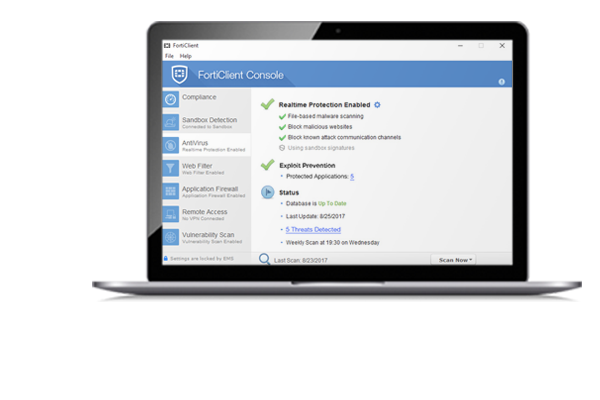
Overview
FortiClient comes in several levels of capabilities, with increasing levels of protection. It integrates with many key components of the Fortinet Security Fabric and is centrally managed by the Endpoint Management Server (EMS).
Core use includes zero trust application access, VPN with continuous assessment, vulnerability agent and remediation, web and video filtering, and endpoint malware protection depending on edition.
Editions on this site mirror the product download lineup: ZTNA Edition, EPP/APT Edition, FortiClient EMS, FortiClient Standalone Edition, and FortiClient VPN-only.
See Download for platform packages and Trust & Security for lawful use guidance.
Feature preview
Capabilities highlighted across ZTNA and EPP editions. Full detail is on the features page.
ZTNA controls and real-time endpoint posture checks before application access.
Feature details
VPN with continuous assessment for remote workers connecting to corporate resources.
Feature details
EPP/APT adds AI-powered AV, anti-ransomware, anti-exploit, and sandbox integration.
Feature detailsWho uses it
SSL or IPsec style remote access with posture checks so unmanaged risk is reduced before users reach applications.
Central management via EMS for provision, patch, quarantine, dynamic categorization, and real-time endpoint visibility.
Standalone Edition for environments that need supported VPN with MFA and do not require EMS.
Editions
Product-class differences across the download lineup.
| Topic | ZTNA Edition | EPP/APT Edition | VPN-only |
|---|---|---|---|
| Zero trust access | Included | Included | Not the focus |
| Malware stack | Core endpoint posture | AI AV, anti-ransomware, sandbox | Upgrade for enterprise tiers |
| EMS management | Central management via EMS | Central management via EMS | Limited compared to enterprise tiers |
| Best for | Zero trust + VPN posture | Full endpoint protection | Basic remote access |
Transparency
Verify hashes and signatures when published. Prefer administrator-approved builds in managed environments.
Use FortiClient only on networks you are allowed to access. Policy details are on Trust & Security.
"ZTNA posture checks made remote access decisions clearer for our admins."
Security engineer
"EMS visibility helped us quarantine endpoints faster during incidents."
SOC analyst
"Standalone Edition covered small sites that did not need full EMS."
IT manager
"EPP features reduced ransomware risk on traveling laptops."
Endpoint admin
"VPN-only was enough for contractors until we upgraded tiers."
Network lead
"Web filtering followed devices outside the office perimeter."
Compliance officer
"ZTNA posture checks made remote access decisions clearer for our admins."
Security engineer
"EMS visibility helped us quarantine endpoints faster during incidents."
SOC analyst
"Standalone Edition covered small sites that did not need full EMS."
IT manager
"EPP features reduced ransomware risk on traveling laptops."
Endpoint admin
"VPN-only was enough for contractors until we upgraded tiers."
Network lead
"Web filtering followed devices outside the office perimeter."
Compliance officer
Quick answers
FortiClient 7.4 is the current product line shown on the downloads experience, with editions that increase protection from VPN-only through ZTNA and EPP/APT.
Enterprise tiers are built for EMS central management. Standalone Edition is designed for small-scale deployments that do not require EMS.
No. This site has no membership forms. Use the download buttons when you need a package.
Open the download page for ZTNA, EPP/APT, Standalone, and VPN-only packages.